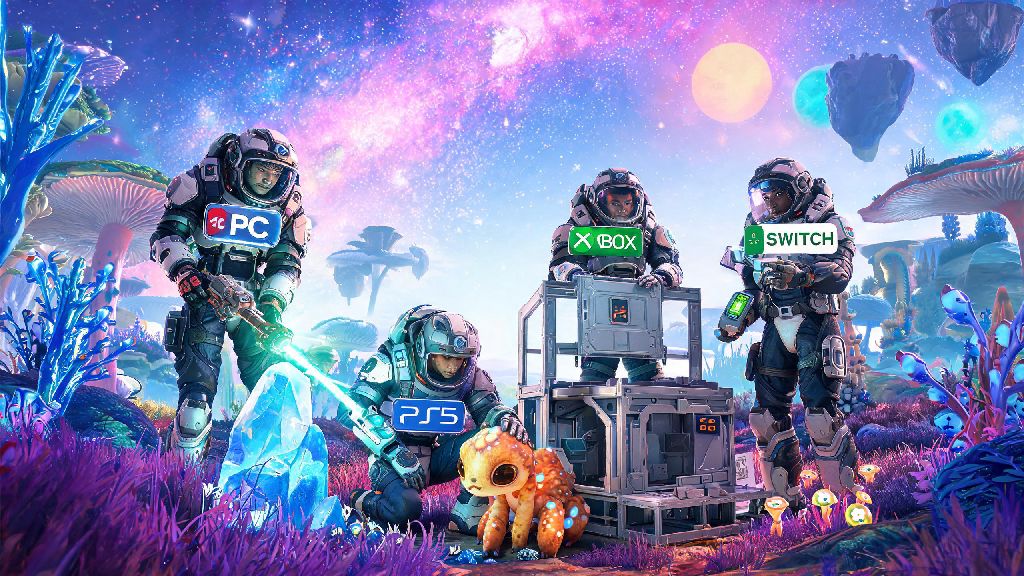
I remember my first 10 hours in No Man's Sky stuck in first person, squinting to see if that distant alien creature was hostile or just grazing, and never being able to get a good look at the cool starship I just grinded 3 hours to repair. I spent 20 minutes scrolling through the settings menu looking for a camera toggle, gave up, and played another 5 hours before a random stranger I met in a space station told me about the quick menu trick. If you’ve ever felt the same frustration, you’re probably wondering how to get out of first person in No Man’s Sky without fumbling through endless nested menus. The good news is it’s way simpler than you think, and works across every platform: PC, PS5, Xbox, even Switch. Switching to third person doesn’t just let you show off your custom character or ship, it also gives you a wider field of view to spot resources, avoid fall damage, and nail tricky base building placements. I’ve put over 400 hours into the game across three platforms, so I’ve tested every method of swapping views to find the fastest, most reliable ones.
How to Get Out of First Person in No Man’s Sky for All Platforms
The fastest way to swap out of first person is using the in-game quick menu, which works no matter what activity you’re doing at the time. The bind to open this menu is slightly different across platforms, but the process of toggling the camera is identical once the menu is open. I’ve listed the default controls for every supported platform below, so you don’t have to dig through your settings to find them.
- PC: Press and hold the X key by default to bring up the quick menu, then select the camera icon to toggle between first and third person for your character, ship, or exocraft.
- PlayStation: Hold down the Down button on your D-pad, navigate to the camera toggle option, and select it to switch view modes instantly.
- Xbox: Hold the Down D-pad button, scroll to the camera icon, and press A to swap between first and third person for your current mode (on foot, ship, etc.).
- Nintendo Switch: Hold the Down button on the left Joy-Con D-pad, select the camera option from the pop-up menu, and confirm to change your view.
That quick toggle is the fastest way to swap views, but if you want to set a permanent default so you never load into first person again, you can do that in the Gameplay tab of the main settings menu. Scroll down to the Camera section, and you’ll see separate options for default on-foot camera, default ship camera, default exocraft camera, and default freighter camera. You can set each one to first or third person individually, so if you prefer first person for flying but third for exploring on foot, you can set it up exactly that way. There’s no limit to how often you can swap views, so feel free to toggle back and forth as much as you want depending on what you’re doing at the time. You don't have to exit your current activity to swap views – the quick menu works mid-flight, mid-combat, even mid-base build, no loading screens required.
Key Reasons to Swap Out of First Person View Regularly
A lot of new players assume first person is the only “authentic” way to play No Man’s Sky, but that’s not true at all. Swapping to third person makes almost every activity in the game easier and more enjoyable for most people. For example, when you’re climbing a steep mountain to get to an ancient ruin, third person lets you see where your next footstep is going to land, so you’re way less likely to slip and fall 100 meters to your death. When you’re taming an alien creature to use as a mount, third person lets you see its full body language, so you can tell if it’s calm or about to run away before you make a move.
Base building is another area where third person shines. First person makes it almost impossible to line up walls, check if your roof is aligned, or see the full layout of your base without walking back and forth every 10 seconds. Third person lets you step back and see the whole structure at once, so you can catch small mistakes before you spend 20 minutes building an entire section of your base crooked. I even use third person when I’m trading in space stations, because it’s easier to navigate the crowded corridors and find the specific NPC I’m looking for without bumping into every other character in the room.
Combat also gets a lot easier in third person. When you’re fighting sentinels or aggressive fauna, third person lets you see attack patterns you’d miss in first person, especially area of effect attacks that land just outside your first person FOV. I once took out a 4-star sentinel walker 10 minutes after switching to third person, because I could see its rocket launcher winding up before it fired, something I never would have spotted in first person. Third person view also eliminates motion sickness for many players who struggle with the narrow FOV and fast movement of first person mode.
How to Customize Your Third Person View for Better Gameplay
A lot of people don’t realize how many camera customization options are hidden in the settings menu, so they stick with the default third person view which can feel a bit too close or too far for comfort. The first setting I recommend adjusting is camera distance, which controls how far the camera sits behind your character or ship. I prefer mine set to 70% for on-foot play, so I can see my character but don’t have the camera so far back that small resources like sodium or ferrite dust are hard to spot. For ship flight, I bump the distance up to 90% so I can see the full size of my ship and spot incoming asteroids easier.
If you play on PC, you can also adjust your FOV separately for first and third person, which makes a huge difference if you play on a large monitor. I set my third person FOV to 110, which gives me almost a full 180 degree view of my surroundings without any weird fish-eye distortion. If you get motion sickness, you can turn down camera shake and camera bobbing to make movement feel smoother. For content creators, there’s also a camera smoothing setting you can adjust to get cleaner, more stable footage for streams or clips.
You can also adjust the ship view offset to move the camera to the side of your ship instead of directly behind, which makes it easier to spot space pirates or abandoned freighters when you’re flying through empty space. Make sure to save your custom camera settings as a preset so you don’t have to re-adjust them every time you update the game or switch platforms. You don’t need any mods to access these customization options – they’re all built into the base game, even on console platforms.
Troubleshooting Common Issues When Switching Out of First Person
While the camera toggle usually works seamlessly, there are a few common bugs and issues that can prevent you from switching out of first person. The most common issue people run into is the quick menu not opening when they press the right bind. That’s usually because you remapped the D-pad down or X key by accident when adjusting other controls. Go to your control settings and search for “quick menu” to reset the bind to your preferred key or button, and it should work again immediately.
Another common issue is the camera getting stuck behind a wall or object when you switch to third person. That’s a common minor clipping bug, so you don’t have to restart your game to fix it. Just toggle back to first person then switch again, or move a few steps to the side to reset the camera position. Some indoor areas like small settlement buildings or space station corridors also limit camera movement to prevent clipping, so you might have to step outside to toggle to third person if the option is greyed out in the quick menu.
One of the most common issues I hear from new players is that their camera gets stuck in first person when they’re using a multi-tool with a large mining attachment. That’s a small bug that Hello Games hasn’t fully fixed yet, but the workaround is simple: just holster your multi-tool, swap to third person, then pull your multi-tool back out. The camera will stay in third person, and you’ll be able to mine as normal without any issues. If your camera keeps resetting to first person every time you load the game, head to the Gameplay tab in settings and set your default camera view for each activity to third person, so it stays consistent across play sessions. If none of these troubleshooting steps work, try restarting your game – most camera bugs are temporary and go away with a quick reboot.
At the end of the day, whether you stick to third person full time or swap between views depending on what you're doing, knowing how to get out of first person in No Man's Sky opens up a whole new layer of gameplay you might have been missing. I still swap back to first person sometimes for close-up resource mining or when I want a more immersive flight through a planet's atmosphere, but I spend 90% of my playtime in third person now. Don't be afraid to mess around with the camera settings until you find what feels right for you – there's no wrong way to play the game, as long as you're having fun exploring all the weird, wonderful worlds the universe has to offer.