I remember spending my first 22 hours of No Man's Sky alone, bouncing between barren planets and mining asteroids for hours just to upgrade my starship. It wasn't until my roommate texted me a game invite that I realized half the fun of the game is experiencing the galaxy with other people. If you're wondering how to play multiplayer No Man's Sky, you're in the right place. We'll cover everything from initial setup to common glitches, so you can skip the frustration and jump straight to shared adventures across 18 quintillion planets.
How to Play Multiplayer No Man's Sky: Initial Setup and Lobby Settings
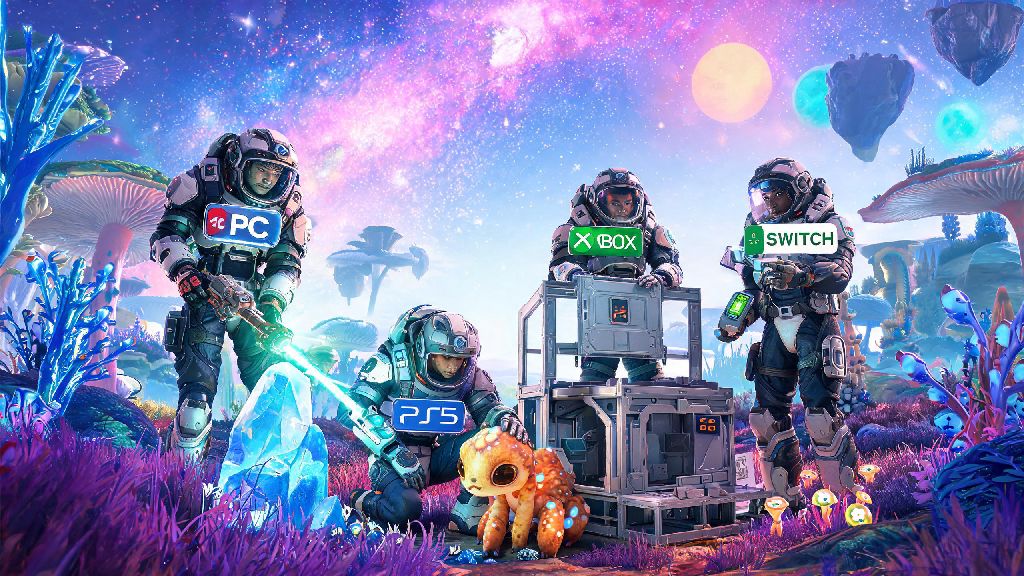
First, you don't have to unlock any special content to access multiplayer. It's available as soon as you finish the opening tutorial and gain access to the main menu's network features. Crossplay is enabled by default for all platforms, so you can team up with friends on PC, PlayStation, Xbox, or Switch without any extra setup work. One thing to note before you dive in: PC players don't need any extra subscription to access multiplayer, but console players will need an active PlayStation Plus, Xbox Live Gold, or Nintendo Switch Online membership to join or host lobbies. That's a common point of confusion for new console players, so double check your subscription status if you're getting access denied errors.
Before you host a lobby, you'll pick a privacy setting that fits your playstyle. You can adjust this setting at any time from the in-game network menu, so you don't have to stick to one option forever:
If you're worried about other players griefing your base or stealing your resources, you don't have to avoid public lobbies entirely. Base damage from other players is disabled by default, and all resources are instanced, so someone else mining a deposit won't take those materials away from you. You can also toggle PvP on or off at any time, so you never have to engage in player combat if you don't want to. I learned this the hard way when a random traveler kept shooting at my starship during my first public lobby, and I was able to turn off PvP in 10 seconds to stop the annoyance entirely.
How to Invite Friends and Join Existing Sessions
There are two simple ways to invite friends to your lobby, depending on whether you already have them added on your gaming platform. The fastest way is to open your in-game quick menu, navigate to the Network tab, select the friend you want to invite from your friends list, and hit send invite. They'll get a notification on their platform that they can accept to join your game immediately, no extra steps required.
If you're playing with someone who isn't on your friends list, you can share your 16-digit lobby code with them, which they can enter in the Join Game tab to access your lobby directly. That's super useful if you're linking up with people you meet in No Man's Sky community groups, and it avoids the hassle of adding random people to your personal friends list. Make sure all players are on the same game version before trying to join, otherwise you'll get a connection error. Most platforms update automatically, but if you play on PC with mods, you might need to disable custom mods to match your friend's vanilla version, or make sure everyone is using the exact same mod pack to avoid conflicts.
If you want to join a random public lobby, you can go to the Join Game tab in the main menu and browse through available lobbies. You can filter lobbies by activity type, like base building, expedition, or pirate hunting, to find groups that are doing the type of content you're interested in. I've joined random public lobbies for community build events before, and I ended up making a few long-term gaming friends from those sessions, so don't be afraid to give it a try if you're feeling social.
Fun Multiplayer Activities to Try With Your Crew
Once you're in a lobby together, the whole galaxy opens up for shared activities that are way more fun than playing solo. The most popular option is shared base building, where you can assign building permissions to your friends so they can add to your existing base, or work together to build a communal outpost on a paradise planet. I built a floating beach resort with three friends last year, and we still go back to it every few months to host virtual meetups and show off new upgrades we've added.
Group combat is another huge draw for multiplayer sessions. Teaming up to take down pirate freighters gives way better loot than solo runs, and you can split the work of disabling their defenses and fighting off enemy fighters to make the runs go much faster. Pirate freighter raids with 3+ players have a 70% higher chance of dropping S-class upgrade modules, according to recent community data, so that's a solid reason to team up if you're trying to max out your starship or multitool upgrades. Running derelict freighter runs together is another great option; having a friend watch your back while you hack terminals makes the spooky, drone-filled abandoned ships way less stressful to navigate.
If you're looking for more structured content, Hello Games runs regular expedition events that are way easier to complete with a group. You can split objectives between players, so one person can hunt for rare creatures while another collects specific resources, cutting the time it takes to finish the expedition in half. You can also just explore planets together, marking rare resources, beautiful views, or dangerous creatures for each other so you don't waste time hunting for things alone. Even just flying through space together and stopping to check out random planets you pass is a great way to kill an evening with friends.
Common Multiplayer Issues and Quick Fixes
Even with all the updates Hello Games has released over the years, No Man's Sky multiplayer still has a few common glitches that you might run into. The most common issue is the "connection failed" error when trying to join a friend's lobby. 90% of the time this is because one player has a strict NAT type. You can fix this by enabling UPnP on your router, or switching to a wired internet connection instead of Wi-Fi to stabilize your connection. If that doesn't work, try having the other person host the lobby instead, since some routers don't play well with the game's hosting system.
Another common issue is friends not showing up in your in-game friends list, even if you have them added on your platform. If this happens, skip the in-game invite system entirely and send a direct platform invite through your PlayStation, Xbox, Switch, or Steam friends list. That almost always works around the glitch, and you'll load into the lobby like normal. If you're having desync issues where you can't see your friend's builds, actions, or character, fast travel to the same space station and back to your current location to resync your game states. That works 8 out of 10 times for me, and it's way faster than restarting the entire game.
If you can't see other players' custom bases when you land on a planet, double check that you have the show other players' bases toggle enabled in your network settings. It's turned on by default, but if you turned it off during your solo play sessions to reduce clutter, you'll need to flip it back on to see community builds and your friends' outposts. Switch players might notice more desync or slower load times during large group sessions, since the Switch version of the game has slightly lower performance limits, but it still works perfectly for small 2-4 player co-op sessions.
Once you know how to play multiplayer No Man's Sky, the whole game feels like a brand new experience. You don't have to grind for resources alone, take on tough enemies solo, or explore empty planets by yourself anymore. Whether you're playing with real life friends or meeting random travelers across the galaxy, the shared moments are the ones that stick with you long after you log off. Don't be afraid to tweak your settings to fit your playstyle, and remember that there's no right or wrong way to enjoy co-op in the game.