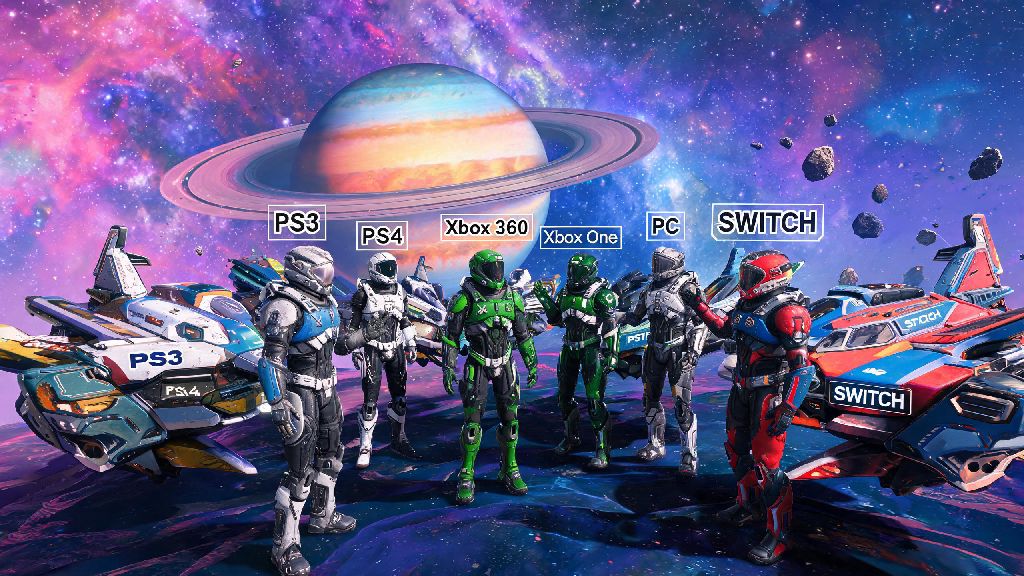
I remember the first time I tried to team up with my buddy in No Man's Sky, I spent 20 minutes fumbling with menus, convinced I was missing an obvious setting. If you've ever stared at your NMS menu wondering how to jump into a shared universe with other players, you're not alone. Figuring out how to join No Man's Sky multiplayer doesn't have to be a confusing chore, even if you're playing across different consoles or PC. The game's crossplay support works across almost every modern platform, but there are a few small hoops you need to jump through to avoid connection drops, wrong lobbies, or accidentally joining a session full of griefers. I've tested every method across PC, PS5, Xbox, and Switch, so I can walk you through exactly what works, what doesn't, and how to fix the most common snags along the way.
How to Join No Man's Sky Multiplayer: Core Steps for All Platforms
Before you do anything, make sure you're connected to the internet, and that your No Man's Sky install is updated to the latest version. Outdated game versions are the number one cause of multiplayer connection failures, so don't skip this check, even if you think you have auto updates turned on. Once you're on the main menu or loaded into your save, follow these simple steps:
For Switch players, note that you'll need an active Nintendo Switch Online subscription to access multiplayer, just like most other online games on the platform. PS and Xbox players also need their respective platform's online subscriptions to join public or friend sessions, so make sure yours is active before you try to connect. If you're playing on PC via Game Pass, you'll also need to link your Microsoft account to your Hello Games account to access crossplay with console players, but that only takes 30 seconds to set up the first time you load the game.
Tips for Joining Friends' Sessions Without Connection Issues
So you've followed the core steps, but you still can't see your friend's session on the list? That's a super common problem, and most of the time it's not your fault. The first thing to check is that both you and your friend have the same network privacy settings turned on. If your friend set their session to "Invite Only", you won't see it pop up in the public lobby list no matter what you do, so ask them to send you a direct invite or share their 8-digit session code instead. Session codes are the most reliable way to join a specific friend's world, because they bypass platform-specific friend list glitches that happen pretty often between, say, Steam players and PSN players.
Another thing to keep in mind is that if your friend is playing in a Permadeath save, you can only join them if you're also loading a Permadeath save of your own. The same rule applies to Survival mode saves – you can't jump into a Survival world with a Normal mode save, and vice versa. That's a rule a lot of new players miss, and it leads to a ton of unnecessary troubleshooting. If you're still having trouble connecting, try restarting your router, or switching from a wi-fi connection to a wired ethernet connection if you can. NMS's multiplayer is pretty sensitive to unstable internet, so even a small drop in signal can kick you out before you finish loading in. Also, make sure you don't have any mods installed that alter the game's core network code, because those will almost always break crossplay connections for you and anyone you try to play with.
What to Expect When Joining Public Multiplayer Lobbies
If you don't have any friends who play NMS, joining public multiplayer lobbies is a great way to meet other players, trade rare resources, or team up to take down big Sentinel raids or build massive community bases. But not all public lobbies are the same, so it's good to know what you're getting into before you join. First, most public lobbies are hosted by players who are happy to have extra help, but you'll occasionally run into hosts who kick people for no reason, or players who grief by destroying other people's builds or stealing resources from base storage. The good news is you can turn on base protection in your network settings to prevent other players from editing your builds even if they join your session, and you can kick or block any player who's causing trouble in just a few clicks.
When you join a public lobby, you'll spawn near the host's current location, but you're free to explore anywhere in their galaxy you want. Any progress you make, like resources you collect, bases you build, or missions you complete, will save to your own save file, so you don't have to worry about losing anything when you leave the session. One fun quirk of NMS multiplayer is that if the host has discovered a system you haven't found yet, you'll get credit for discovering it too when you visit it in their session, which is a great way to fill out your discovery log fast. I once joined a public lobby where a group of players were building a giant replica of a Star Trek ship, and I ended up staying for three hours helping them lay down hull panels – that's the kind of random fun you can only get in public NMS lobbies. Just don't expect every public lobby to be full of activity. A lot of hosts leave their lobbies open by accident, so you might join a session where the host is AFK or focused on their own single-player tasks. If that's the case, you can just leave quietly and join another one, no hard feelings required.
Fun Activities to Try Once You're in a Multiplayer Session
A lot of players join NMS multiplayer just to hang out, but there are tons of specific activities that are way more fun with a group than they are alone. For starters, teaming up to take down pirate fleets or capital freighters is way easier with multiple people manning different ship weapons, and you'll get a bigger reward split if you take down the target faster. You can also team up to build massive community bases, with different players focusing on different parts like farming, power generation, or decorative builds. If you're feeling competitive, you can host or join custom races on player-built race tracks, or have a base building contest with a group of friends.
Another underrated multiplayer activity is running group Nexus missions from the Space Anomaly. These missions give you bonus units and nanites for completing them with a group, and some of the higher difficulty missions are almost impossible to complete alone. If you're playing with a group of experienced players, you can also coordinate to explore uncharted regions of the galaxy together, sharing discoveries and setting up waypoints for each other so no one gets lost. Just make sure you communicate with your group about what you want to do first – there's nothing worse than joining a session expecting to do a pirate raid, only to find out the rest of the group wants to spend three hours farming gravitino balls. You can always split off and do your own thing if you don't feel like joining the group activity, no one will hold it against you.
At the end of the day, figuring out how to join No Man's Sky multiplayer is only the first step to getting the most out of the game's shared universe. Don't get discouraged if you run into a few connection issues on your first try – even seasoned players run into glitches every now and then. Once you're in a session, you'll find that exploring, building, and fighting alongside other players adds a whole new layer of fun to a game that's already full of surprises. Whether you're teaming up with old friends or making new ones in public lobbies, the shared galaxy of NMS has something for every type of player.